ILLUMINATOR Hybrid-LCD
WatchBasePersonalization
4.150.00 Reviews
- Version
- Varies With Device
- Installs
- 10.00K
- Age Rating
- Everyone
Screenshots
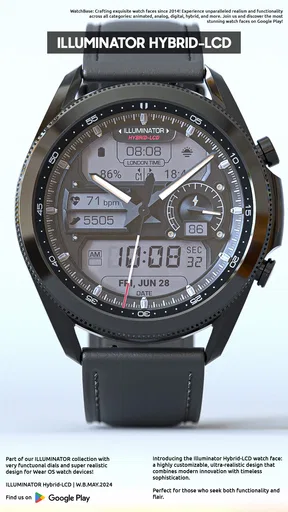
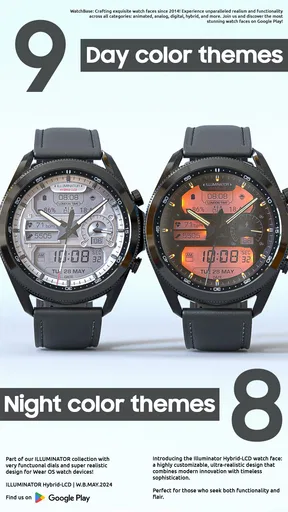
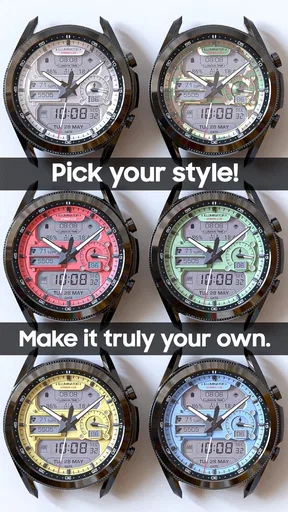
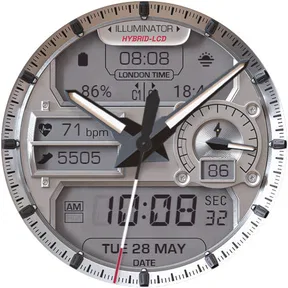
Our Review of ILLUMINATOR Hybrid-LCD
 Analysis by Appyee
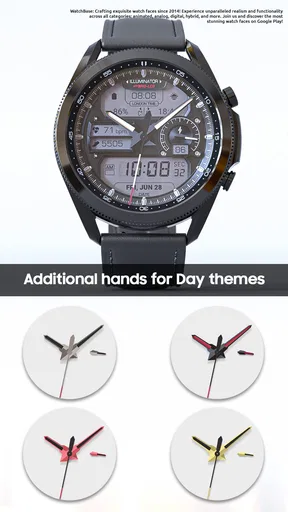
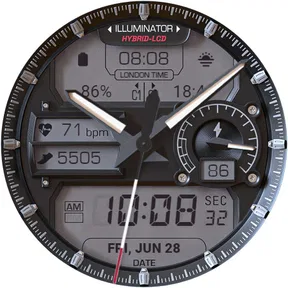
A watch face is something you look at in passing, so its real test is not whether it looks striking in a screenshot but whether it stays legible and useful through an ordinary day. ILLUMINATOR Hybrid-LCD is a personalization app for people who want their smartwatch to evoke a hybrid LCD display rather than resemble a plain digital dial. I like the idea most for someone who enjoys a technical, instrument-like look and still wants the face to feel tailored to their own habits.
That style also sets expectations: this is about changing the watch’s appearance, not replacing the watch’s health tools or turning it into a new device. The design is the reason to consider it, while the practical question is whether its information remains easy to read at a glance. If you already prefer a minimal face with only the time, a richly styled hybrid display may feel busier than you want.
What the hybrid look is good for
The appeal of an LCD-inspired face is that it can give a smartwatch a more purposeful, digital-instrument character. I’d consider it for a workday when I want a quick glance to feel organized, or for casual wear when the usual minimalist options look too generic. A distinctive face can make a familiar watch feel more personal without changing how I use the watch itself.
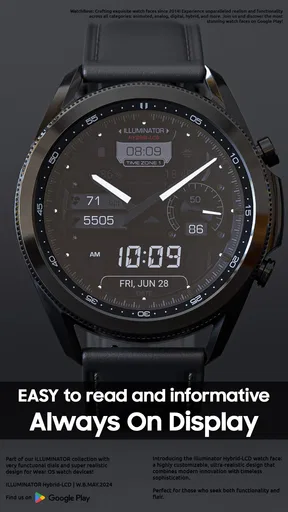
There is a trade-off between visual character and instant clarity. The more elements a face presents, the more important spacing and contrast become on a small display. I’d take a moment to judge it on the watch rather than relying only on how it appears in a phone preview: a design that looks detailed up close can feel crowded when checked mid-walk or between tasks.
First Impressions
So, I downloaded ILLUMINATOR Hybrid-LCD with a mix of excitement and skepticism. Right off the bat, the installation was smooth and quick, which is always a good sign. When I launched the app, I was greeted with a clean and intuitive interface. The developers clearly put some thought into making the app user-friendly, which I appreciate because nobody wants to spend ages figuring out how to use an app.
From installation to a useful first glance
One thing to keep straight from the outset is that this is a watch-face app in the personalization category, not a phone-screen adjustment utility. The name can suggest a display tool for a handset, but the product is intended to give a compatible watch a particular face. That distinction helps avoid the wrong expectation before you spend time browsing or adjusting options.
For a first-time user, I’d make the first goal modest: get the face onto the watch, look at it in the lighting where you normally check the time, and decide whether its style and readability suit you. Then adjust one aspect at a time rather than trying to perfect every detail immediately. This makes it much easier to tell whether a change genuinely improves the glance experience or merely looks different in the preview.
A realistic first success might be setting it up before a commute, then checking the time while waiting for a train without opening the phone. If the face is immediately readable and feels like your style, that is a more useful test than spending a long session comparing every possible appearance. If it does not work for that quick glance, there is little reason to keep tuning it just because customization is available.
Diving into the Features
Let’s talk features. I’ll be honest, the range of options in this app is pretty impressive. It’s designed to enhance the visual output of your phone by optimizing the screen’s brightness and contrast, which is perfect for those of us who are glued to our screens day and night.
The app offers a simple yet effective slider to adjust the brightness and contrast settings. What’s cool is that it automatically adapts to the ambient light conditions, meaning you don’t have to keep fiddling with settings every time you move from a dark room to the outdoors. I found this feature particularly handy when I was binge-watching shows late at night. The screen was easy on the eyes, and I didn’t have to squint or strain.
Making customization serve readability
With a detailed face, customization is most useful when it solves a real viewing problem. I’d start by deciding which details I need to recognize at a glance, then keep the overall look from competing with them. A face can be attractive while still being inconvenient if the time or the information I check most often gets lost among decorative elements.
It is also worth testing the same setup across a few situations instead of judging it under one ideal condition. A watch may be checked indoors, outdoors, and while moving, and a configuration that looks balanced in one place may be harder to scan in another. My practical tip is to make small adjustments, wear the face for a normal stretch of the day, and only then decide what needs changing.
Customization Galore
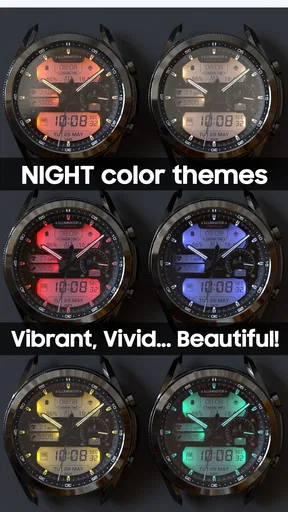
Customization is where ILLUMINATOR Hybrid-LCD really shines. It lets you personalize your screen experience based on your preferences. Whether you’re a fan of vibrant colors or prefer a more subdued palette, there’s something for everyone. You can even save your favorite settings as presets, so switching between them is a breeze.
The app also provides a night mode, which I found extremely useful. It reduces blue light, which is notorious for messing with your sleep cycle. I tested it out over a week, and I genuinely noticed a difference in my sleep quality. Who knew a simple app could contribute to a better night’s sleep?
How I’d decide whether to keep it
For me, a good test is whether the face still feels comfortable after the novelty wears off. I’d use one preferred setup for the routine parts of the day, then consider a different saved look only if there is a clear reason, such as wanting a bolder appearance for casual wear. Too many tiny tweaks can turn personalization into another task, so presets are most helpful when they represent genuinely different choices rather than near-identical experiments.
The key question for anyone comparing watch faces is not simply which one offers more options. A conventional simple face is usually the better choice if you value maximum visual quiet or want the least possible setup. A hybrid LCD design makes more sense if its distinctive style is part of the point and you are willing to spend a little time making the layout comfortable for your eyes and habits.
Performance & Usability
Now, let’s discuss performance. The app runs seamlessly without hogging your phone’s resources. I was initially worried it might slow down my device, but thankfully, that wasn’t the case. It’s lightweight and doesn’t drain the battery, which is a relief because the last thing anyone needs is an app that guzzles up power.
In terms of usability, I found it to be quite straightforward. The settings are easy to navigate, and the app didn’t crash or freeze during my testing period. It’s reliable, which is crucial for an app that you might end up using daily.
Useful checks before settling in
Before treating any watch face as a daily choice, I’d confirm that the watch and its software support the face, then check how it looks on the actual watch display. Compatibility matters more than a polished phone-side preview: if the face cannot be installed or does not render as expected on your device, extra customization will not fix the basic mismatch. A quick check early on saves frustration.
Battery expectations deserve a similarly practical approach. A face is a visual choice, and its effect can depend on the watch and how it is used, so I would not assume that an attractive design automatically improves battery life. If you are particularly protective of charge, compare your usual routine before and after switching and be ready to return to a simpler face if you prefer that balance.
Who Will Benefit?
So, who’s the target audience for ILLUMINATOR Hybrid-LCD? Honestly, it’s perfect for anyone who spends a significant amount of time on their phone. Whether you’re a gamer, a binge-watcher, or someone who uses their phone for work, enhancing your screen’s display can make a world of difference.
It’s also great for those who are concerned about eye strain or want to improve their sleep quality. The night mode and customizable settings are fantastic for reducing the negative impact of prolonged screen time.
Who may prefer a different face
I’d recommend considering it if you enjoy customizing your watch and want a more characterful digital look than the standard faces usually provide. It could suit someone who checks the time often during a busy day and wants a display that feels more personal, provided the details remain clear at a glance. WatchBase is the developer, and the app has an average rating of 4.2 from around 658 ratings, which gives a prospective user a useful sense of how other users have responded without making that figure a guarantee of fit.
On the other hand, I would skip it if you mainly want a plain clock, dislike spending time adjusting a watch face, or need a particular display arrangement that you cannot confirm before installing. It is also not the right choice for someone shopping for a phone brightness or eye-comfort utility; the product is intended for watch personalization. Being clear about that distinction is more helpful than expecting one app to cover both jobs.
Price and the decision to try it
The app costs $1.79, so I’d treat the purchase as a small style decision rather than a must-have upgrade. If you already know you like hybrid LCD designs, the price may feel reasonable for a face you expect to wear regularly. If you are uncertain whether this look suits you, compare it mentally with the watch faces you already enjoy and ask whether the visual change is valuable enough to justify paying for another option.
It is rated for Everyone and has passed 10K+ installs, but neither broad age suitability nor adoption tells me whether the design will suit an individual watch or personal taste. I’d still put compatibility and legibility first. The app was released on May 17, 2024, and its listing shows 44 reviews; those details give context, while the most useful decision remains whether the face looks right on your own device.
Final Thoughts
To wrap it up, ILLUMINATOR Hybrid-LCD is a gem of an app that delivers on its promises. It’s easy to use, packed with features, and genuinely enhances your smartphone experience. While it might not be the most revolutionary app out there, it definitely adds value to your daily phone use. If you’re looking to upgrade your screen experience without breaking the bank, give it a try. It might just become one of your go-to apps!
My recommendation is narrower and more practical: choose it if you want a distinctive hybrid-style watch face and enjoy making a display feel like your own. Give yourself a short setup session, check readability during a normal day, and keep only the adjustments that make the information easier or more enjoyable to use. If a familiar, minimal face already serves you perfectly, there is no need to switch just for novelty; if you want your watch to look less generic, this is a reasonable option to explore.
Verdict
Strengths of ILLUMINATOR Hybrid-LCD
- Bright display even in low-light settings.
- User-friendly interface with intuitive controls.
- Lightweight design for easy portability.
- Energy-efficient, extending device battery life.
- Supports a wide range of media formats.
Limitations of ILLUMINATOR Hybrid-LCD
- Limited customization options available.
- May require frequent software updates.
- Higher price compared to similar apps.
- Occasional lag with large files.
- Limited offline functionality.
Other Releases by WatchBase
View All
ILLUMINATOR Digital Watch face
Personalization4.3
Similar Picks in This Category
View All
Microsoft SwiftKey AI Keyboard
SwiftKey4.3

Wallpapers
Google LLC4.1

Zedge™ Wallpapers & Ringtones
Zedge4.7

Yandex Browser with Alice AI
Direct Cursus Computer Systems Trading LLC4.3

Ringtone Maker:create ringtone
Big Bang Inc.4.7

Fonts Keyboard
Fonts Keyboard3.9
Frequently Asked Questions
What is ILLUMINATOR Hybrid-LCD and how does it work?
ILLUMINATOR Hybrid-LCD is an innovative app designed to enhance your device's display capabilities. It functions by utilizing a hybrid LCD technology, providing users with improved brightness, color accuracy, and energy efficiency. The app optimizes screen settings based on user preferences and ambient lighting conditions, ensuring a superior visual experience.
Is ILLUMINATOR Hybrid-LCD compatible with all devices?
While ILLUMINATOR Hybrid-LCD aims for broad compatibility, it is essential to verify if your device supports the specific requirements. The app is generally compatible with most recent Android and iOS devices, but checking the app store listing for any device-specific restrictions is recommended before downloading.
Does using ILLUMINATOR Hybrid-LCD affect battery life?
ILLUMINATOR Hybrid-LCD is designed to enhance screen performance while maintaining efficient power usage. However, as with any display-enhancing app, increased screen brightness and color adjustments may lead to slightly higher battery consumption. Users can adjust settings within the app to balance performance with battery life.
How easy is it to use ILLUMINATOR Hybrid-LCD?
The app is designed with user-friendliness in mind, offering an intuitive interface that allows users to easily adjust settings. Whether you're tech-savvy or a novice, the app provides guided tutorials and tips to help you make the most of its features, ensuring a seamless user experience.
Are there any privacy concerns with ILLUMINATOR Hybrid-LCD?
ILLUMINATOR Hybrid-LCD prioritizes user privacy and does not collect personal data without consent. The app may request access to certain device settings for optimal performance, but these permissions are transparent and can be managed through your device's privacy settings. Always review the app's privacy policy for detailed information.
